-1.png?width=154&height=80&name=Tokenize.it_logo_midnightblue%20(3)-1.png)
.png?width=588&height=327&name=image%20(21).png)
Prerequisite
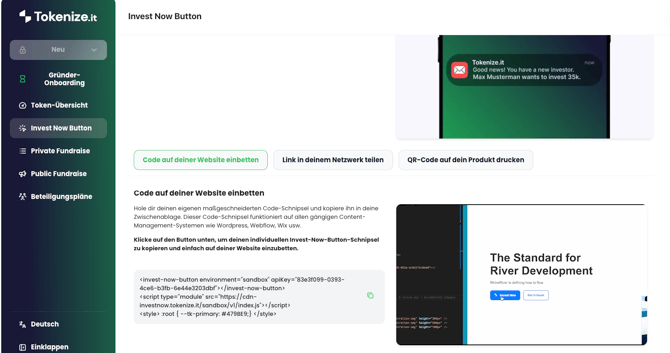
Onboard as a founder on our platform and generate your own Invest Now Button
WIX
To enable the integration of the code, you must have at least a basic subscription and a domain.
.png?width=670&height=473&name=image%20(22).png)
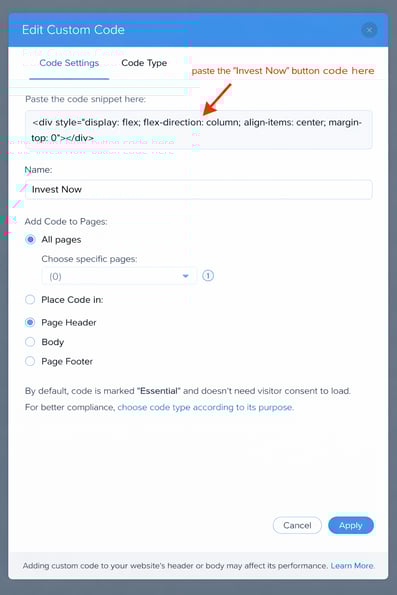
Choose an appropriate location on your website and insert the Invest Now Button code into the code section.
WordPress
You'll need the paid version of WordPress to access full file editing and plugin installation capabilities.
Option 1 (recommended):
Insert the code into the appropriate section of your themes or plugins.
.png?width=631&height=263&name=image%20(24).png)
Option 2:
Insert the code into the appropriate section of your theme or plugin.
.png?width=665&height=217&name=image%20(25).png)
Webflow
A basic subscription and domain are required to integrate the code.
.png?width=663&height=282&name=image%20(26).png)
Troubleshooting
The ‘null’ is shown instead of the company name in the text above the form.
Look into the console and the network tab of your browser’s developer tools.
If you see a failed request to the URL “https://sandbox.tokenize.it/api/trpc/investNowButtonVX.getInvestNowButtonData” (X in VX is a number), check if your API key is correct.
If you use the “Content-Security-Policy” header in your server configuration or in a “http-equiv” meta tag, than you need to include the following two policy directives in the header or meta tag value:
script-src 'self' https://cdn-investnow.tokenize.it; connect-src 'self' *https://app.tokenize.it ;